
Double entry: ledger, trial balance, balance sheet, and income statement (P&L)
Understand and use the ERP Instfy double entry reports: ledger summary, trial balance, balance sheet, and income statement (P&L).
The Double Entry module brings together the company's accounting statements. In the double entry method, every transaction affects at least two accounts, one debited and one credited, and total debits always equal total credits. Use this module to close the month, check balances, and give your accountant and partners a reliable view of results and equity.
Before you start
The reports are only reliable if the underlying data is in order:
- Chart of accounts reviewed in Accounting > Chart Of Accounts. See Accounting.
- Activity for the period recorded: sales and purchase invoices, payments received and made, revenue, and expenses. See Sales invoices and Purchasing.
- Bank accounts reconciled with the statements in Accounting > Banking.
| Menu | Question it answers |
|---|---|
| Ledger Summary | What moved in each account and what is the balance? |
| Trial Balance | Do debits and credits balance? |
| Balance Sheets | How much does the company own and owe, and what is its equity? |
| Profit & Loss | Did the company make a profit or a loss in the period? |
| Reports | Other available accounting reports |
View the Ledger Summary
The ledger shows the entries and balance account by account. Use it to investigate an unusual balance or audit a transaction.
Menu path: Double Entry > Ledger Summary
- Open Double Entry > Ledger Summary.
- Set the period and, if available, the account you want to analyze.
- Apply the filter to list the debits, credits, and balance of the accounts.
- Click a row or account, when available, to see the entry details.
How to read it: each account shows what was debited, what was credited, and the resulting balance. An unexpected balance usually points to an entry posted to the wrong account.
Check the Trial Balance
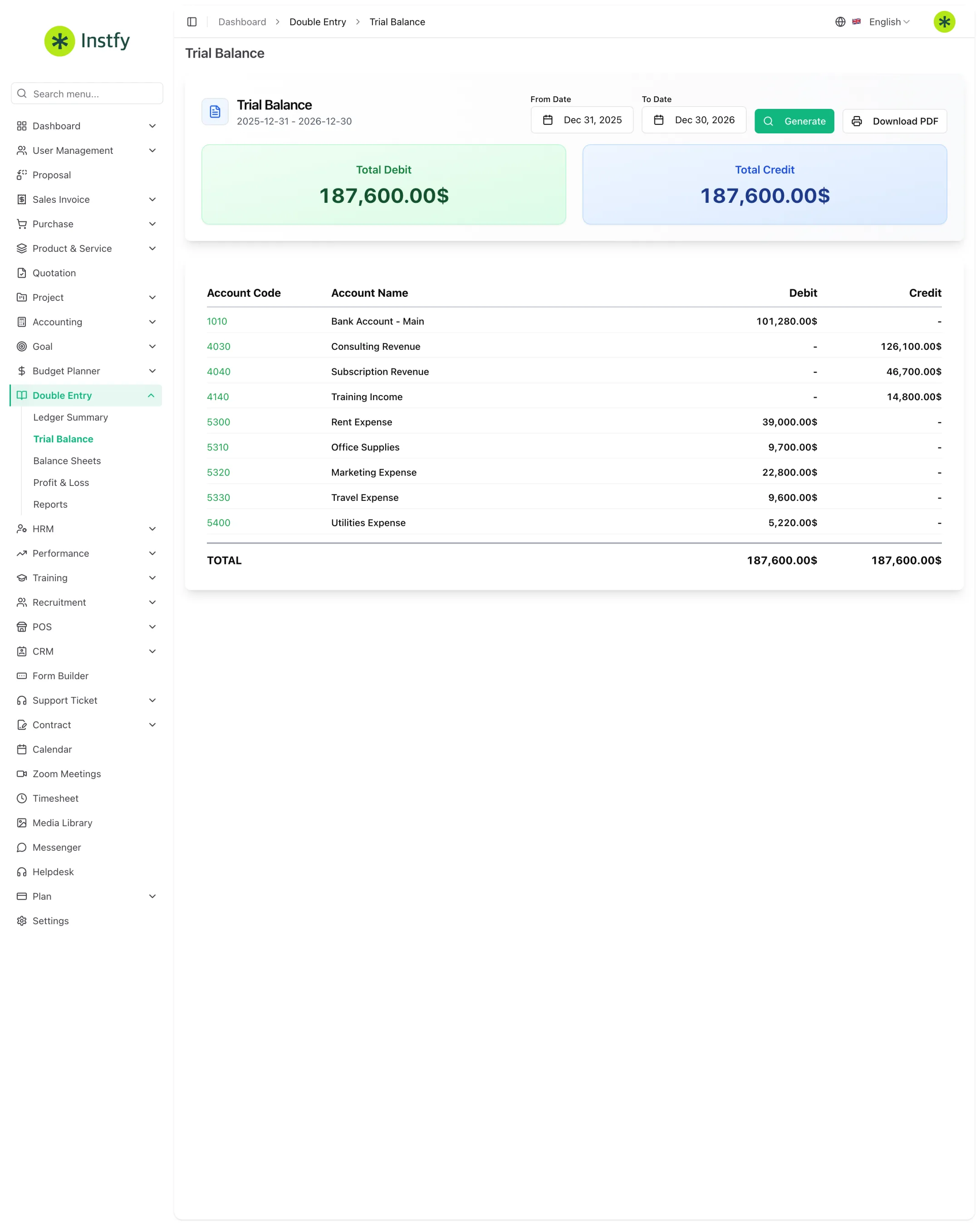
The trial balance lists the balance of every account as of a date. It is the first test of the close.
Menu path: Double Entry > Trial Balance
- Open Double Entry > Trial Balance.
- Set the period or reference date and apply the filter.
- Check at the bottom that total debits equal total credits.
- If they do not balance, go back to the Ledger Summary to find the problem account.
Run the trial balance before the balance sheet and the income statement (P&L). If it does not balance, the other reports will be wrong too.
Analyze the Balance Sheets
The balance sheet shows the company's position on a date: assets (what it owns), liabilities (what it owes), and equity (the difference).
Menu path: Double Entry > Balance Sheets
- Open Double Entry > Balance Sheets.
- Choose the reference date or period and generate the report.
- Review the asset, liability, and equity groups.
- Check that total assets equal total liabilities plus equity.
When to use it: at the monthly or annual close, for credit applications, and in conversations with partners and investors.
View the income statement (Profit & Loss)
The income statement (P&L) shows a period's revenue, costs, and expenses and the bottom line: profit or loss.
Menu path: Double Entry > Profit & Loss
- Open Double Entry > Profit & Loss.
- Set the period (month, quarter, or year) and generate the report.
- Read from top to bottom: revenue, then costs and expenses, down to the result.
- Compare with previous periods to spot trends.
Profit is not the same as cash in the bank. The income statement (P&L) considers the period's revenue and expenses; the bank balance depends on when amounts were actually received and paid.
Use the other Reports
Menu path: Double Entry > Reports
- Open Double Entry > Reports.
- Choose the available report that meets your needs.
- Set the period and filters and generate the report.
- Export or print it, when the option is available, to send to your accountant.
Complete flow
Transactions (invoices, payments, revenue, expenses) > Chart of accounts > Ledger Summary > Trial Balance > Balance Sheets and Profit & Loss > Accountant and decisions
- Transactions are recorded in Sales invoices, Purchasing, and Accounting.
- Amounts are classified in the Chart Of Accounts accounts.
- You check the ledger and the trial balance.
- You generate the balance sheet and the income statement (P&L) for the close.
- You compare the results with the Budget planner and Goals.
Frequently asked questions
Which report should I run first at month-end close?
The trial balance (Trial Balance). If debits and credits balance, move on to the balance sheet and the income statement (P&L). If they do not, use the Ledger Summary to find the problem account before continuing.
What is the difference between the balance sheet and the income statement (P&L)?
The balance sheet (Balance Sheets) is a snapshot of the company on a date: what it owns, what it owes, and its equity. The income statement (Profit & Loss) is a movie of a period: how much came in, how much went out, and whether there was a profit or a loss.
Why does the trial balance not balance?
Usually because of incomplete entries or entries classified in the wrong account. Check the Ledger Summary for accounts with unusual balances and correct the original entry in the corresponding module.
Does the income statement (P&L) show how much I have in the bank?
No. The income statement (P&L) shows the result (revenue minus expenses) for the period. For the available balance, check the accounts in Accounting > Banking or the Account Dashboard.
Where is the chart of accounts?
In Accounting > Chart Of Accounts. The Double Entry module uses these accounts to build the reports.
Next steps
With your statements in hand, compare them with the plan and set goals for the next period.