
Support tickets and knowledge base (Support Ticket)
Receive and answer customer tickets, organize them by category, and publish articles and FAQs to cut down on repeat questions.
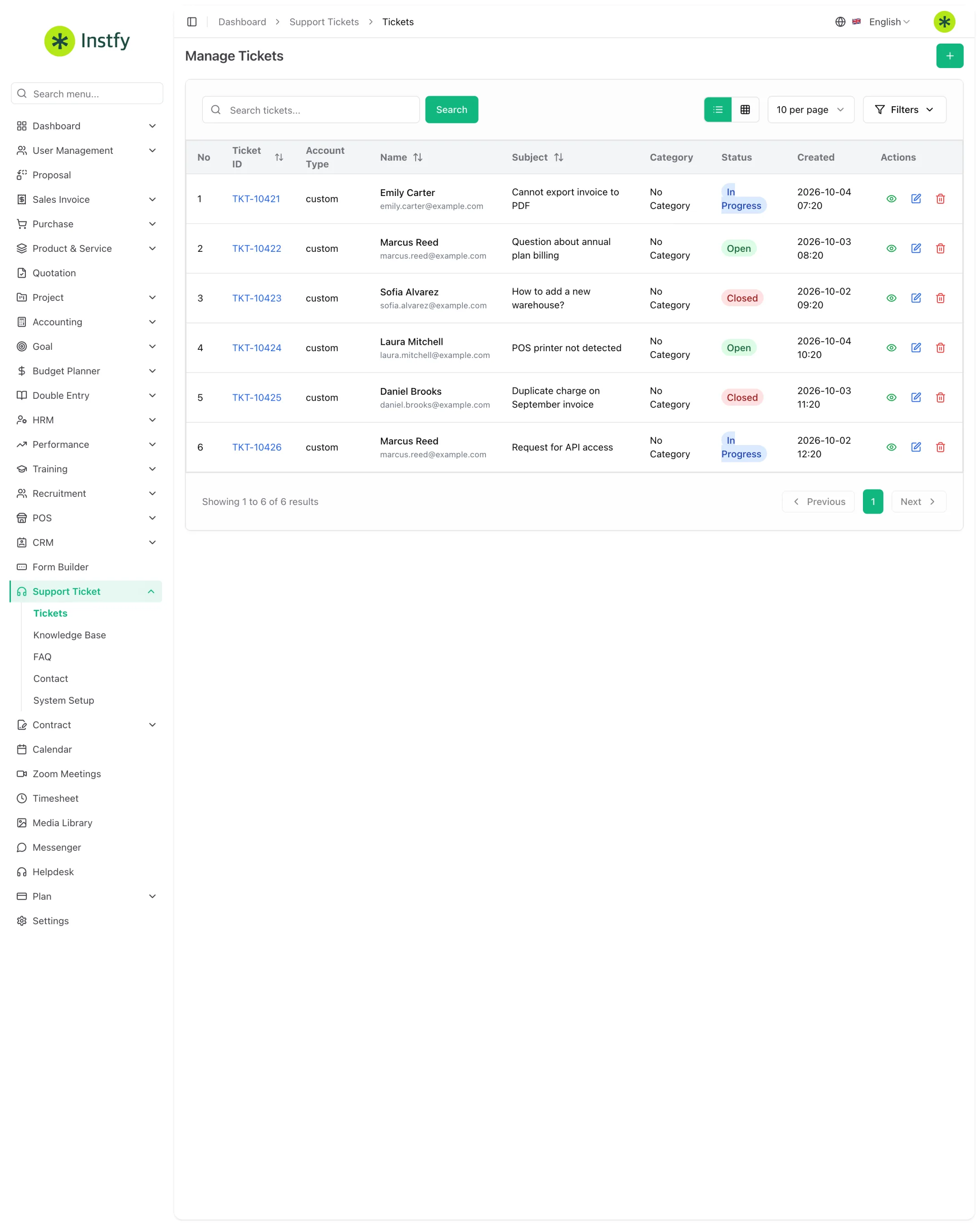
The Support Ticket module is your company's help center for your customers. It brings together tickets, the knowledge base, frequently asked questions, and incoming contacts, with an overview in Dashboard > Support Dashboard. Use it when support moves beyond personal email and needs history, an owner, and a deadline.
Before you start
- Add the people who will handle support as users, in Users and roles, and give them permission for the module.
- Define your support categories (for example: Billing, Technical, Sales).
- Review the Support Setting tab in Company settings.
Set up support categories and settings
Categories organize tickets and help route each one to the right person.
Menu path: Support Ticket > System Setup and Settings > Support Setting
- Open Support Ticket > System Setup. The ticket categories screen opens.
- Click the + button (Create), enter the category name, and click Save.
- Review the other lists in the setup's internal menu, if any.
- Open Settings, go to the Support Setting tab, review the support options, and click Save Changes.
Open a ticket
Record every customer request as a ticket, even those that came in by phone or WhatsApp, to keep the history.
Menu path: Support Ticket > Tickets
- Open Support Ticket > Tickets.
- Click the + button (Create).
- Enter the customer details, category, priority, subject, and description of the request. Attach files if it helps.
- Click Save. The ticket appears in the list, ready to be handled.
Reply to and close a ticket
Support happens inside the ticket, so the entire conversation is recorded.
Menu path: Support Ticket > Tickets
- Open Support Ticket > Tickets and click the ticket.
- Read the history and write your reply in the message field. Attach files if needed.
- Send the reply and update the status as it progresses.
- When the issue is resolved, change the status to closed.
Use the list's status and category filters every day. A forgotten ticket often turns into a bigger complaint.
Publish knowledge base articles
Articles explain how to solve common problems. Every good article prevents several tickets.
Menu path: Support Ticket > Knowledge Base
- Open Support Ticket > Knowledge Base.
- Click the + button (Create).
- Write the article title and content, with clear steps.
- Click Save.
Maintain the FAQ
The FAQ answers the simplest questions in a sentence or two.
Menu path: Support Ticket > FAQ
- Open Support Ticket > FAQ.
- Click the + button (Create).
- Write the question and the answer.
- Click Save. Review the FAQ whenever the same question shows up in several tickets.
View incoming contacts
The contacts area collects the messages received through the support contact channel.
Menu path: Support Ticket > Contact
- Open Support Ticket > Contact.
- Read the messages received.
- When a message needs follow-up, open a ticket in Tickets to record the support.
Monitor the support dashboard
The dashboard shows ticket volume and how it is distributed, so you can adjust your team.
Menu path: Dashboard > Support Dashboard
- Open Dashboard > Support Dashboard.
- Check the total number of tickets and the distribution by status and category.
- Identify high-volume categories and create articles or FAQ entries for them.
Complete flow
- Set up categories in System Setup and settings in Settings > Support Setting.
- Record every request in Tickets.
- Reply inside the ticket and close it when resolved.
- Turn repeat questions into Knowledge Base articles and FAQ entries.
- Track volume on the Support Dashboard.
Frequently asked questions
What is the difference between Support Ticket and Helpdesk?
Support Ticket is your company's help center for your customers. Helpdesk, a standalone menu item, is a separate ticket channel. See the comparison in Helpdesk.
What is the difference between the Knowledge Base and the FAQ?
The Knowledge Base holds complete, step-by-step articles. The FAQ holds short answers to simple questions. Use both together.
Can I record tickets that came in by phone?
Yes. Open the ticket in Support Ticket > Tickets with the customer's details. That way every interaction is in the same history, regardless of channel.
How do I reduce the number of tickets?
Check the Support Dashboard for the categories with the most requests and publish articles and FAQ entries on those topics. Every published answer keeps the same question from coming in again.
Next steps
Learn about the Helpdesk and see customer service best practices.