
Purchasing and inventory
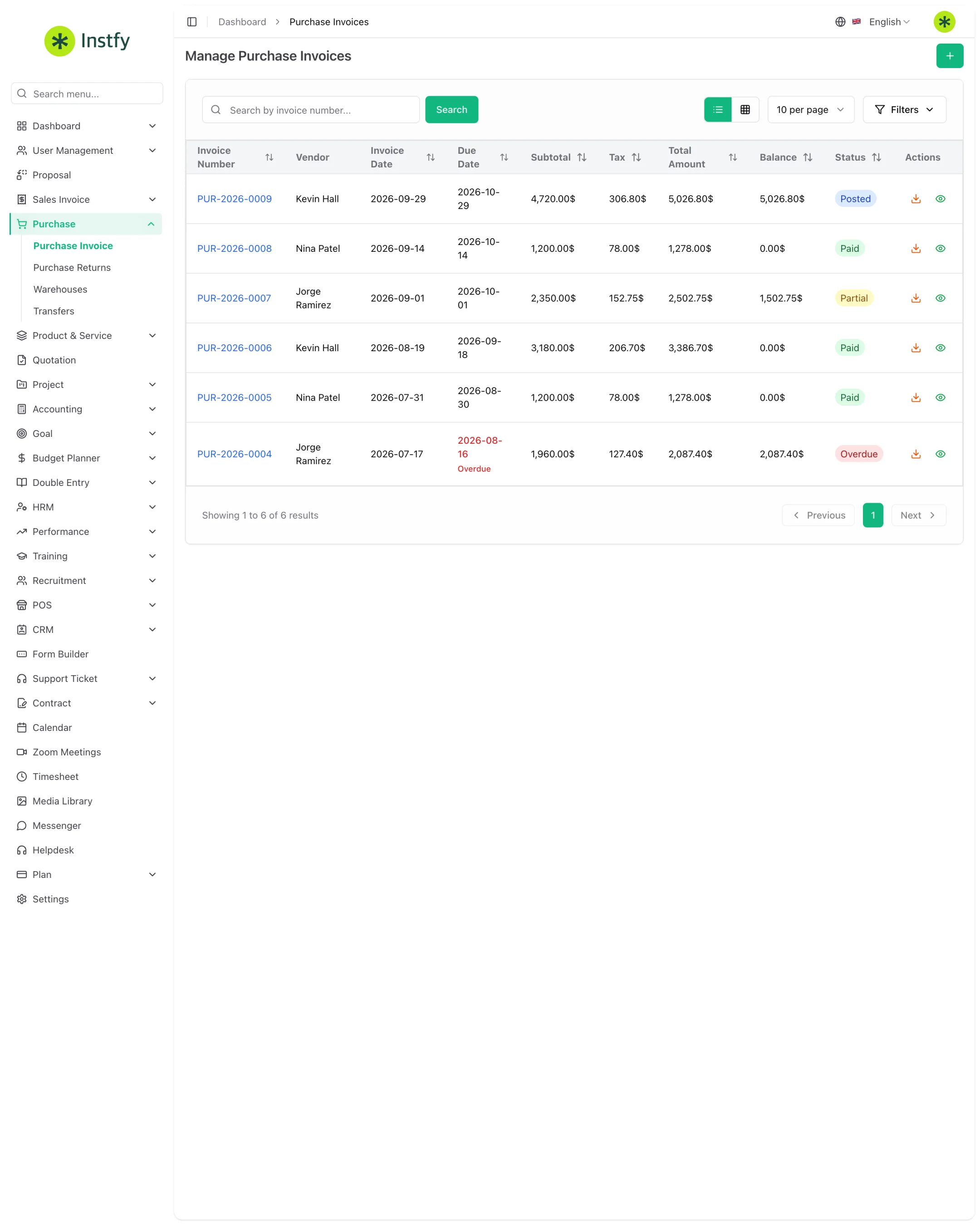
Record purchase invoices, returns to vendors, warehouses, and stock transfers, and pay vendors through finance.
The Purchase module brings together everything that comes into the company from vendors and where it is stored. You record the purchase invoice, handle returns, organize warehouses, and move goods between them with transfers. Vendor payments are made in Accounting > Vendor Payments, to keep accounts payable and cash in sync.
Before you start
- Vendors created in Accounting > Vendors. See Accounting.
- Items created in Product & Service > Items, with purchase price and tax. See Products and services.
- Bank account in Accounting > Banking, to record where the payment comes from.
| Menu | What it is for |
|---|---|
| Purchase > Purchase Invoice | Record purchases from vendors |
| Purchase > Purchase Returns | Return items to the vendor |
| Purchase > Warehouses | Create warehouses and view balances |
| Purchase > Transfers | Move stock between warehouses |
| Accounting > Vendor Payments | Pay vendors |
Create a warehouse
Every product in stock lives in a warehouse. Create at least one before your first purchase.
Menu path: Purchase > Warehouses
- Open Purchase > Warehouses.
- Click Create (or the + icon).
- Enter the warehouse name and the requested location details.
- Click Save. The warehouse now appears in purchases, transfers, and the POS.
Create one warehouse per physical location (e.g., "Downtown Store", "Main Warehouse"). That way the system balance matches what is on each shelf.
Record a purchase invoice
Menu path: Purchase > Purchase Invoice
- Open Purchase > Purchase Invoice.
- Click Create (or the + icon).
- Select the vendor and enter the purchase and due dates.
- Choose the warehouse that will receive the products.
- Add the items with quantity, purchase price, tax, and discount. Check the total.
- Click Save. The purchase enters the list and, for products, the warehouse inventory is updated.
Record the purchase when the goods or the bill arrive, not only when you pay. That way accounts payable and inventory reflect reality.
Pay the vendor
The payment is recorded in finance and reduces the open balance of the purchase invoice.
Menu path: Accounting > Vendor Payments
- Open Accounting > Vendor Payments.
- Click Create (or the + icon).
- Select the vendor and the purchase invoice being paid.
- Enter the amount, date, and the bank account the money came from.
- Click Save. The purchase invoice becomes partially paid or paid.
Return items to the vendor
Use a return when goods arrive defective, in excess, or incorrect.
Menu path: Purchase > Purchase Returns
- Open Purchase > Purchase Returns.
- Click Create (or the + icon).
- Select the vendor and the original purchase invoice.
- Enter the returned items and quantities and, if applicable, the reason.
- Click Save. The return is linked to the original purchase.
If the vendor will refund the money or apply it to future purchases, also record a debit note in Accounting > Debit Notes.
Transfer stock between warehouses
Menu path: Purchase > Transfers
- Open Purchase > Transfers.
- Click Create (or the + icon).
- Choose the source warehouse and the destination warehouse.
- Select the products and quantities.
- Click Save. The balance leaves the source and enters the destination, without creating a purchase or a sale.
Complete flow
Vendor > Purchase invoice > Stock into the warehouse > Vendor payment > Sale (invoice or POS) > Reports
- Create the vendor in Accounting > Vendors and the item in Products and services.
- Record the purchase invoice in the right warehouse.
- Pay in Accounting > Vendor Payments.
- Sell through the POS or Sales invoices.
- Expenses and balances appear in Accounting and Double entry.
Frequently asked questions
Where do I record a payment to a vendor?
In Accounting > Vendor Payments. Select the vendor, the purchase invoice, the amount, the date, and the account the money comes from. The purchase status is updated based on the amount paid.
Does the purchase invoice increase my inventory?
Yes, for product-type items. The quantities go into the warehouse chosen on the purchase. Services do not move inventory.
What is the difference between a purchase return and a debit note?
A return (Purchase Returns) records the items that went back to the vendor. A debit note (Accounting > Debit Notes) records the amount the vendor now owes your company.
Does a transfer between warehouses create an expense?
No. A transfer only moves quantities from one warehouse to another. It does not create a purchase, sale, revenue, or expense.
Can I have more than one warehouse?
Yes. Create as many as you need in Purchase > Warehouses. Each warehouse has its own balance, used in purchases, transfers, and the POS.
Next steps
With inventory stocked and vendors paid up, keep an eye on finance.